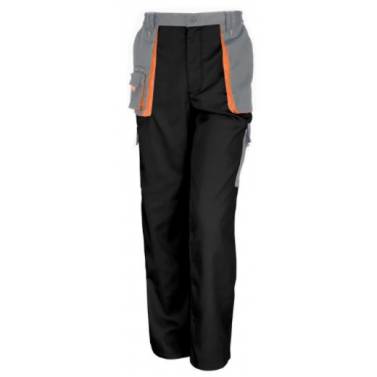
The DX4 Work Trouser is ergonomically designed and uses the targeted placement of dynamic 4X stretch fabrics to give maximum range of movement when working. The trouser features a high-rise back waistband with side elastication, ensuring protection in all working positions. Pre-bent top loading adjustable knee pad pockets, generously sized front pockets and multi-functional zip thigh pockets offers secure storage of phone, pens and tools. Triple stitching throughout for maximum durability.
- 4-way stretch fabric for ease of movement and added comfort
- Free pair of kneepads included with this trouser
- Lightweight flexible HiVisTex Pro segmented reflective tape for increased visibility
- Reflective piping for increased visibility
- 11 pockets for ample storage
- Two tier knee pad pockets allowing two positioning options
- Top-loading knee pad pockets for quick and easy access
- Multiple side zip compartments for secure storage
- Rule pocket
- Large back zip pocket for multiple storage options
Fabric
93% Polyester, 7% Elastane 270g
Additional Contrast Fabric Info : Contrast Fabric: 65% Polyester, 35% Cotton Ripstop Weft Stretch 235g
Knee Reinforcement: 88% Nylon, 12% Elastane 275g
Standards
EN 14404:2004+A1:2010 Type 2 Level 0 (when used in combination with S156)
Standard delivery to mainland UK is free for all orders over £150 (Ex VAT) and just £5.50 if the order total is under £150.
Products without a logo or personalisation will have an average delivery time of 2-3 working days or 3-5 working days depending on the product.
Products with a logo or other form of personalisation will have a standard delivery time of 7-10 working days
Option to fast track orders is available at check out.
Note: Items cannot be left without a signature being given by the recipient.
Once you have chosen the colours and sizes of the garments you wish to purchase, click on the "Add To Cart".
Once you have done this, an option will pop up reading "Add Customisation". Click this and begin your customisation.
If you want to customise later, simply continue shopping and when your are ready "Checkout". In the checkout section, select the "Add Customisation" button underneath the garments you want to customise.
From there you will then be able to choose the logo you wish to apply, along with the application method, position and any other requirements you may have.
The positions in the "Add Your Logo" page represent the locations to which your logo and other designs can be applied to this garment.